How to Send WhatsApp “Thank You” Messages After Yotpo Reviews Using Dondy & Shopify Flow

Updated: Apr 29
Collecting reviews is important, but acknowledging customers after they submit a review is what truly builds long-term relationships.
With Dondy’s WhatsApp integration, Yotpo reviews, and Shopify Flow, you can automatically send a thank-you WhatsApp message to customers the moment they submit a product review. This creates a positive post-review experience, reinforces brand loyalty, and shows customers that their feedback truly matters.
This automation allows you to:
Instantly thank customers for submitting reviews
Use WhatsApp for faster, more personal communication
Automate acknowledgements using Shopify Flow
Keep everything scalable and hands-free
Let’s walk through step by step how to set this up using Dondy, Yotpo, and Shopify Flow.
How This Automation Works (High-Level Overview)
Here’s what happens behind the scenes:
A customer submits a product review on Yotpo.
Shopify Flow detects the new Yotpo review event.
Shopify Flow triggers Dondy’s WhatsApp action.
The customer receives a Thank You WhatsApp message automatically.
Step 1: Create a Shopify Flow Template in the Dondy App
First, you need to create a WhatsApp message template inside Dondy that will be used by Shopify Flow.
Open the Dondy App.
Go to the Automation Page.
Click Create Automation Flow.

Enter a Flow Name (for example: Yotpo Review Thank You).
From the Flow Type dropdown, select Shopify Flow – Operational.
Configure your message content:
Select Language.
Customize the Message Body.
Add Footer text if required.
Click Create Flow.

Step 2: Note the Template ID and Wait for Approval
After creating the flow:
Open the newly created flow.
Note down the Template ID - this will be required later in Shopify Flow.
Wait until the template status becomes Approved.
⚠️ Important: Flow will not work until the template is approved.

Step 3: Create a Workflow in Shopify Flow
Once your template is approved, you can move to Shopify Flow.
Open the Shopify Admin Panel.
Go to Apps → Flow.
Click Create Workflow.

Select the Trigger
Click Select a Trigger.
Search for New Yotpo Review and select it.

Step 4: Add Dondy WhatsApp Action
Now you’ll define what happens after a review is submitted.
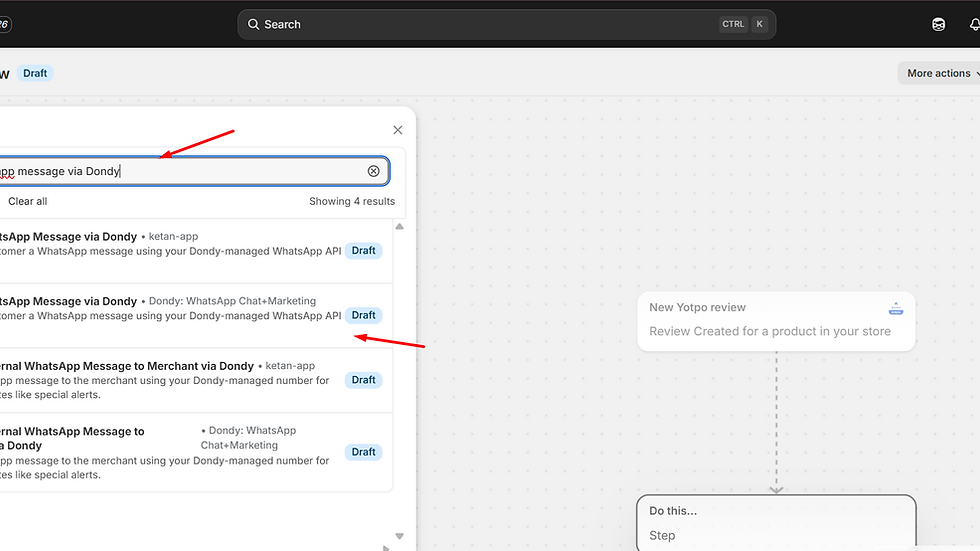
Click the + (Plus) Icon to add an action.
Search for Dondy.
Select Send a WhatsApp Message via Dondy.
Step 5: Configure Workflow Details
Now you need to map Yotpo data to your WhatsApp template.
Enter Template ID
In the Template ID field, enter the Template ID you noted in Step 2.
Add Template Parameters
Under Template Parameters:
Add variables matching the shortcodes used in your Dondy message.
For example:
For customer name → click Add Variable → select reviewerName.
📝 You can add multiple parameters using comma-separated values, based on how many variables your template uses.
Override Customer Email
In Override Customer Email:
Click Add Variable.
Select reviewerEmail.
This ensures correct customer identification when sending the WhatsApp message.

Step 6: Option to Add Conditions
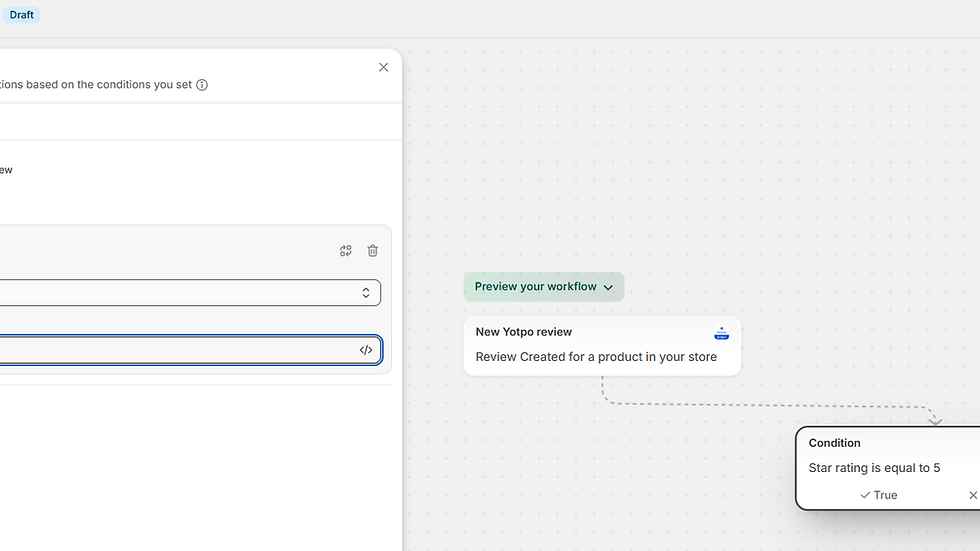
If you would like to send a different message based on the review rating, you can add a condition before the WhatsApp message is sent. Here is how to do it:
Press + → Add condition → Add variable → Add Value.

Step 7: Turn On the Workflow
Once all details are filled:
Review the workflow configuration.
Click Turn On Workflow.
🎉 Your Shopify Flow workflow is now live.

What Happens After Setup?
Once everything is active:
A customer submits a product review on Yotpo.
Shopify Flow triggers automatically.
Dondy sends a Thank You WhatsApp message to the customer.
Example use cases:
“Thank you for sharing your feedback!”
“We appreciate your review — it helps us improve.”
All messages are sent instantly and automatically.

Final Thoughts
The Dondy + Yotpo + Shopify Flow integration closes the loop on customer feedback by turning reviews into meaningful conversations. With this setup, merchants can:
Acknowledge reviews instantly.
Improve customer satisfaction.
Strengthen post-purchase engagement.
Automate without writing custom code.
If you’re already collecting reviews with Yotpo, this automation ensures customers feel heard, valued, and appreciated - right on WhatsApp.
Boost Your Brand with Dondy
Don’t miss out on the chance to enhance your customer relationships. By automating your review acknowledgments, you can focus on what truly matters: growing your business. With Dondy, you can leverage personalized communication on WhatsApp to significantly boost revenue, improve customer retention, and maximize conversions.
Start your journey today!


Comments